Turn a drawing into a real photo
Your child draws it. DoodlyBoo photographs it and brings back a photorealistic version of exactly what they imagined — same pose, same colours, same wonderfully strange details.
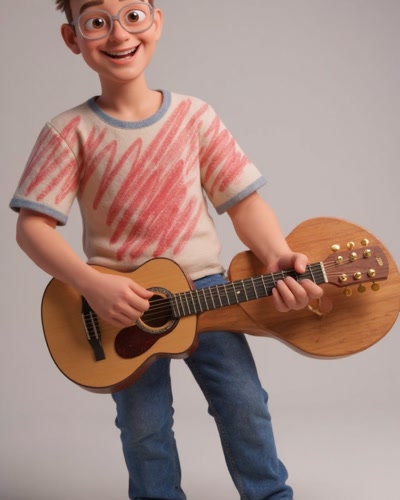
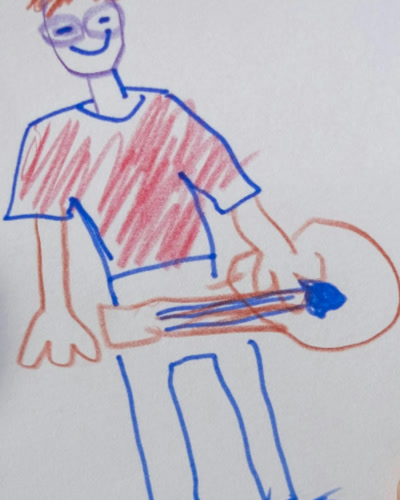
Drag the handle to compare the original drawing with the AI result.
What photo transformation actually does
Most AI image tools ask you to describe what you want in words and then invent something from that description. Drawing-to-photo works the other way round. The drawing itself is the instruction. The AI follows the lines your child put on the paper and renders the same subject as if it had been photographed.
That distinction matters more than it sounds. A child who draws a dragon with six legs and a hat wants to see their dragon made real — not a generic stock dragon. Keeping the original composition is what makes the result feel like magic rather than a novelty.
Getting the best result
- Flatten the paper. Creases and curled corners confuse the AI more than you would expect.
- Use daylight, not flash. Even indirect window light beats an overhead bulb or a phone flash.
- Frame the whole sheet. Cropping into the drawing loses context the AI uses.
- Go over faint lines. A light pencil sketch traced with a darker pen reads far more clearly.
- Let bold colour stay bold. Strong crayon and marker give the AI the most to work with.
What happens to the drawing afterwards
Your drawings stay private by default. They are only visible to other people if you deliberately share them to the community gallery, and you can make them private again at any time. We do not sell your data. The full detail is in our Privacy Policy.
Beyond a still image
A photo is the beginning. The same drawing can also be turned into an animated video that moves, or given a voice so it becomes a talking character.